


New release: Disabled account handling for Affiliates, editable API keys & more
This week’s HostBill update introduces a collection of enhancements: From configurable handling of disabled affiliate accounts and editable API keys to more flexible OpenStack cloud-init management and login rate limiting, these additions give administrators greater control while making HostBill even more convenient to use.
Better control over disabled affiliate accounts
A new Disabled account handling option has been added to Affiliate Settings (Clients → Affiliates → Affiliate Settings). This setting allows administrators to define how disabled affiliate accounts should be handled, providing greater flexibility in managing affiliate programs and ensuring account behavior matches your business policies. You can now choose between two handling modes:
- Notify, disable new commissions – the affiliate is informed that their account has been disabled, no new commissions are generated, but they retain access to the Affiliate section where they can view their existing commission history and account information.
- Disable affiliate section – the affiliate is notified that their account has been disabled, new commissions are stopped, and access to the entire Affiliate section is blocked.
These options allow you to choose the approach that best fits your affiliate program, whether you want former affiliates to retain read-only access to their historical data or completely disable access after the account has been deactivated.
Editable API keys
Managing API access is now easier than ever. Administrators can now edit existing API keys instead of creating new ones whenever changes are required. Additionally, every API key now has an Active/Inactive status, making it simple to temporarily disable access without deleting the key entirely. This improves both administration and security, especially when rotating credentials or troubleshooting API integrations.
OpenStack: Cloud-init scripts per operating system
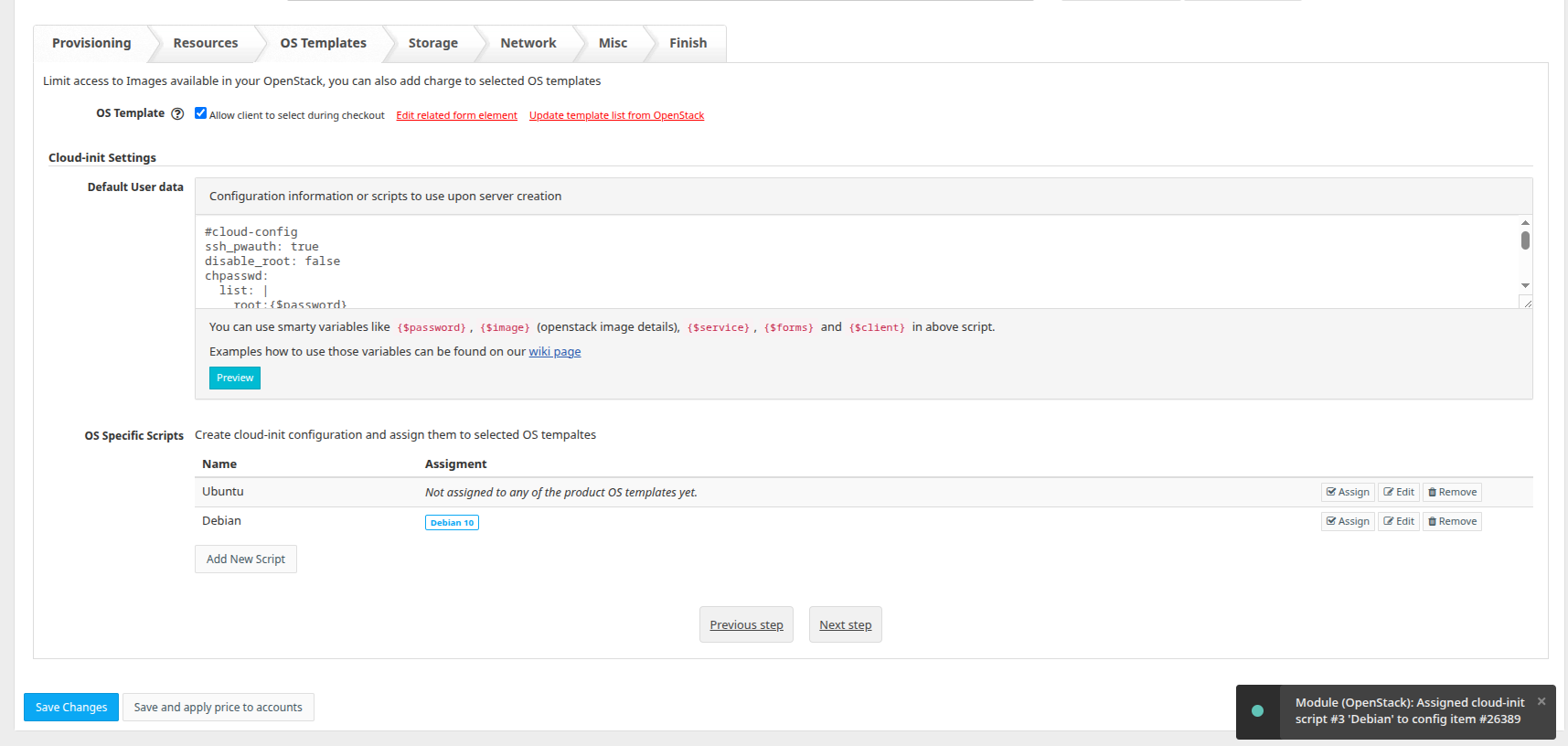
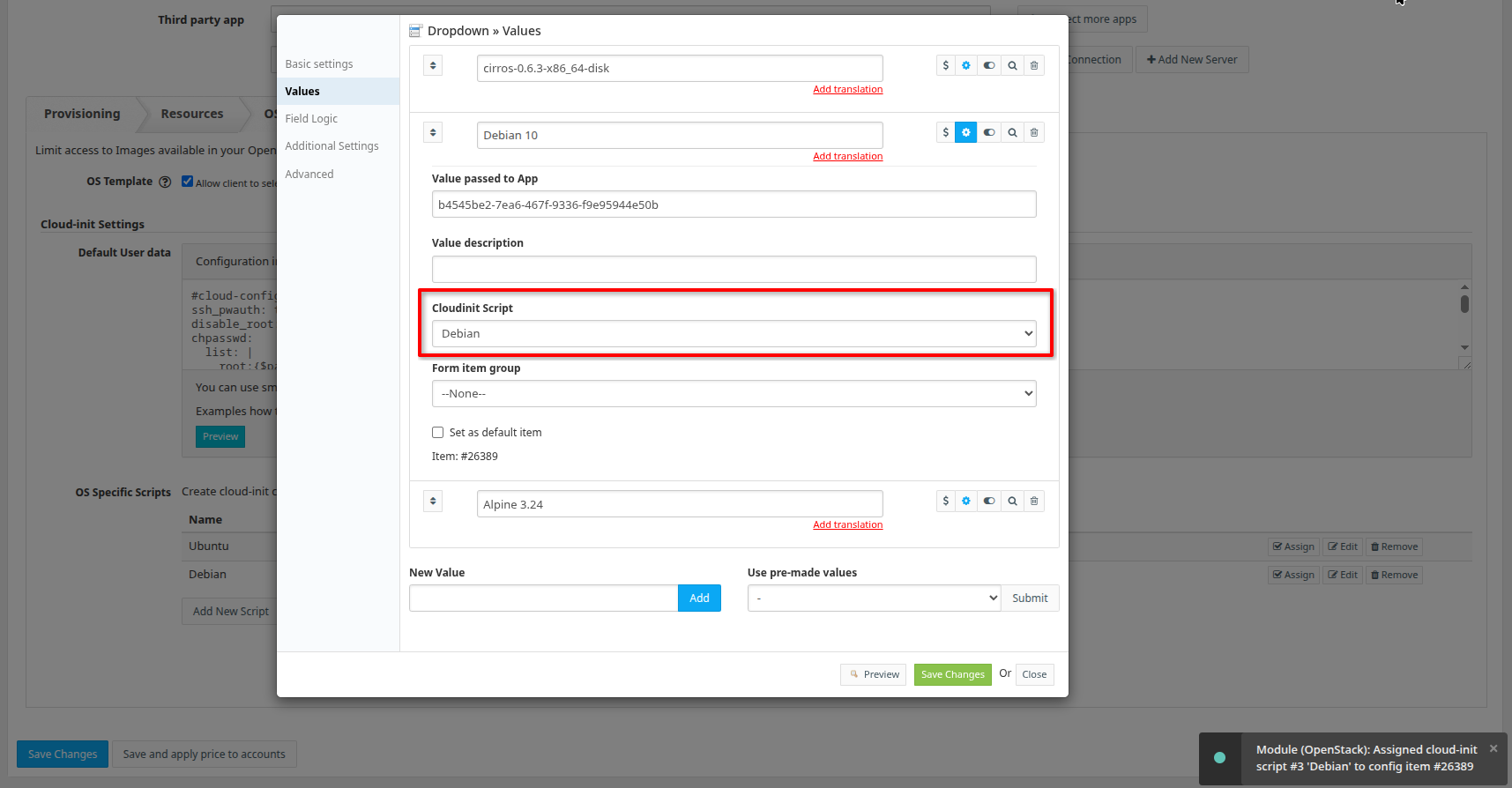
HostBill’s OpenStack integration has become even more flexible. Instead of relying on a single cloud-init script for all virtual machines, administrators can now configure different cloud-init scripts for individual operating system images within the product configuration. When a client deploys a server, HostBill automatically applies the script assigned to the selected OS image. This makes it much easier to tailor initialization tasks to the specific requirements of Linux distributions, Windows images, or custom templates without maintaining multiple products.
Other improvements
A new Hide graph source name option has been added to the Graphs dashboard widget so that administrators can simplify graph presentation by hiding the source name when it is unnecessary, resulting in a cleaner and more focused dashboard.
The Date To filter in CSV Export has been improved. Previously, selecting an end date could unintentionally exclude records created later on that same day. The filter now correctly includes all records from the selected end date, making exported reports more accurate and eliminating the need for date workarounds.
To help protect both administrators and customers against brute-force login attempts, HostBill now supports login rate limiting for both the admin and client areas. This additional security layer limits repeated authentication attempts, helping safeguard accounts while maintaining a seamless login experience for legitimate users.
The User API has been extended with additional service information. Service details now include information about any submitted cancellation request, allowing API integrations to detect pending cancellations without requiring additional queries or manual verification. This enhancement makes it easier to synchronize external systems and automate service lifecycle management.