


New Inventory Manager, DNS, SLA and Domain management features in HostBill!
The new release puts a particularly strong focus on Inventory Manager, with new tools for ownership tracking, file management and account assignments. It also expands DNS management with client comments and DNSSEC enhancements, introduces Client SLA management for administrators, and delivers useful updates across domain ordering, security rules and several integrations.
Inventory Manager update: Ownership tab & file attachments
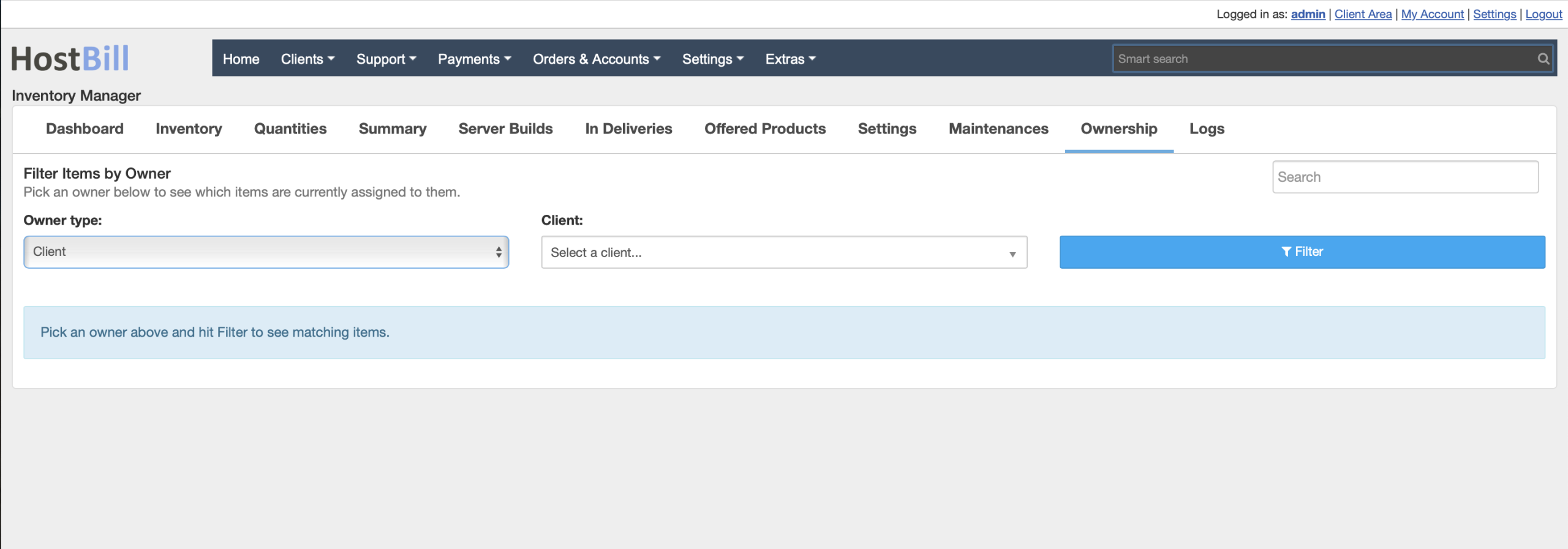
Inventory Manager is designed to help businesses keep track of physical and virtual assets, their availability, ownership and lifecycle. With this release, finding assets assigned to particular owners becomes much easier thanks to the new Ownership tab. The new tab provides administrators with a dedicated place to search for inventory items by owner. Instead of navigating through individual items to determine who an asset belongs to, admins can quickly find all relevant items based on ownership information. This new option can be especially useful for businesses managing large inventories of servers, hardware components, networking equipment, licenses or other resources distributed among multiple clients, employees or locations. The new ownership-focused view makes it easier to answer questions about who currently holds a particular asset and quickly locate all items associated with a given owner.
Deliveries in Inventory Manager can now include file attachments. Administrators can attach relevant documents directly to a delivery, keeping important information together with the corresponding delivery record. Depending on your workflow, these attachments could include delivery documentation, invoices, receipts, shipping documents, signed confirmations, equipment specifications or other files related to the transaction.
File management has also been extended to individual inventory items. Administrators can now upload files and associate them directly with a specific item. This opens up many possibilities for organizing asset documentation. A server or network device could have its specification sheet attached, hardware could include warranty documentation or photographs, and other inventory items could have manuals, certificates, purchase records or configuration documents stored directly alongside their HostBill records.
Inventory Manager now also allows administrators to assign accounts to inventory items. This provides another layer of information that can be stored and managed directly with an asset. It makes it easier to establish relationships between inventory items and the accounts associated with them, improving organization and providing administrators with additional context when viewing or managing individual assets.
Together with the new Ownership search and file attachment capabilities, this update makes Inventory Manager an even more comprehensive tool for tracking not only what assets you have, but also who they belong to, which accounts are associated with them and which documents accompany them.
Client comments for DNS zones
DNS management receives several related improvements in this release. Clients can now add and edit a short comment for their DNS zones. A simple comment can make a significant difference when an account contains numerous DNS zones. Clients can use comments to record the purpose of a zone, identify the project or service associated with it, leave an internal note or simply add information that makes individual zones easier to recognize.
DNS zone comments are available through the DNS Services functionality and can also be viewed and edited in the DNS Zone Editor, keeping the information accessible wherever clients manage their zones. Support for DNS zone comments has additionally been introduced to the UserAPI, allowing the same information to be incorporated into custom applications, client portals and automated workflows.
Fetch DNSKEY records directly from authoritative nameservers
HostBill’s domain management capabilities have been expanded with a new configuration option for the DNSSEC widget. Administrators can now configure the widget to allow clients to fetch DNSKEY records from authoritative nameservers. This can simplify DNSSEC management by allowing the required DNSKEY information to be retrieved directly from the authoritative DNS infrastructure rather than requiring clients to obtain and enter the data separately. The new option gives hosting providers additional flexibility in deciding how DNSSEC should be handled within their client-facing domain management workflow.
New Client SLA management
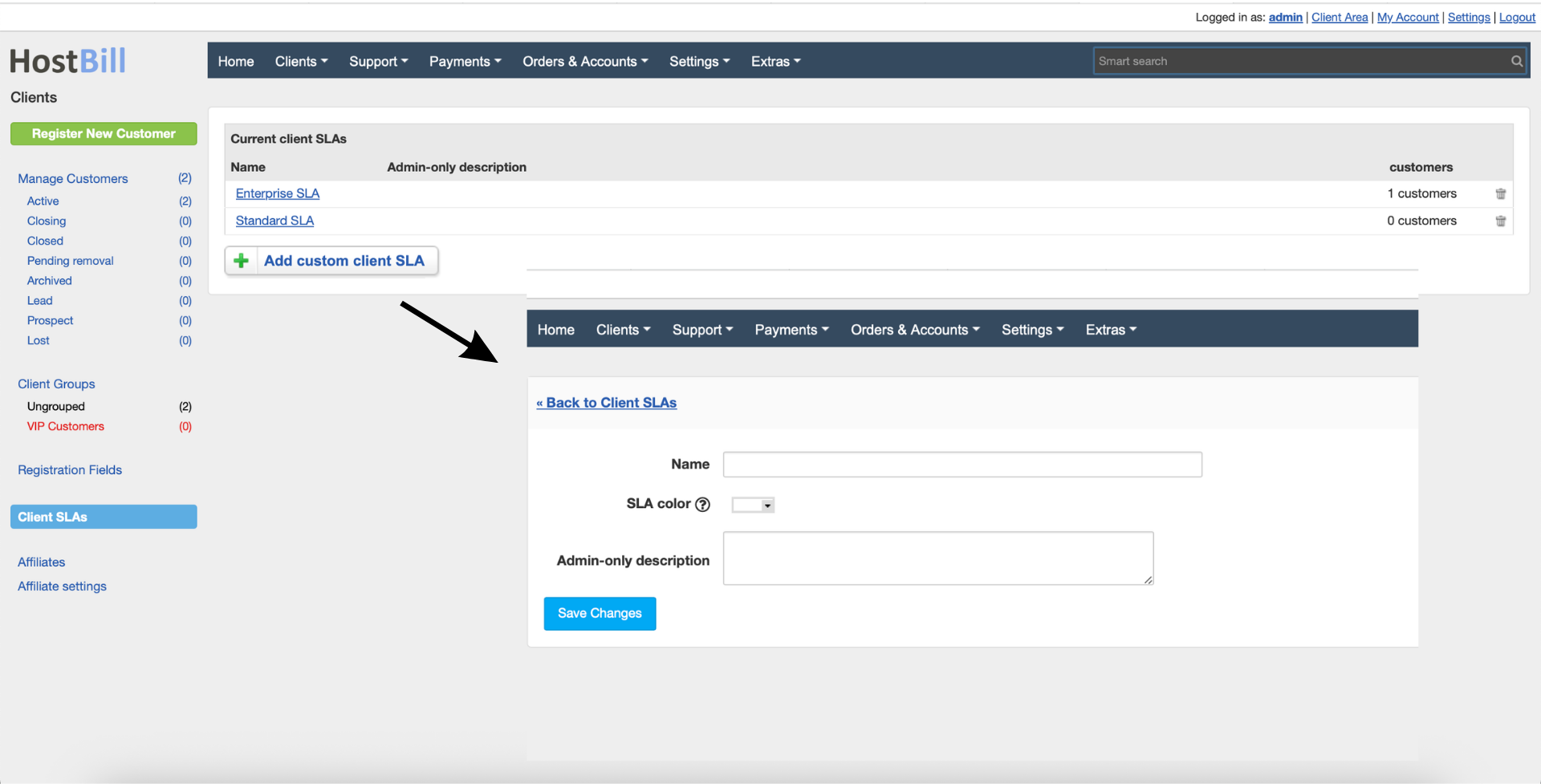
One of the major administration improvements in this release is the introduction of Client SLA management, available in Clients -> Clients SLAs. Administrators can now create custom SLAs associated with clients and have this information highlighted throughout relevant areas of the HostBill admin interface. SLA information is visible across client listings, client details and single-item views, making important service-level information easier to notice during everyday work.
For businesses serving customers under different contractual or support arrangements, immediate SLA visibility can be particularly valuable. Support and administrative teams can identify the applicable service level without having to search through external notes or documentation. This helps teams maintain awareness of client-specific obligations while handling accounts and services and makes SLA information a practical part of the day-to-day HostBill workflow rather than a detail stored outside the billing and automation platform.
Other improvements
The Client IP Whitelist now displays the description associated with each allowed IP address. Descriptions provide useful context, especially when a client has multiple addresses on the whitelist. Rather than seeing only a list of IP addresses, users can immediately understand what a particular entry represents, making whitelist management clearer and reducing the chance of removing or modifying the wrong address.
Domain ordering can now be streamlined by hiding unavailable domains from search results. A new configuration option has been introduced for the Domain R16 order page, allowing administrators to configure domain searches so that only available domains are displayed. The same option has also been added to the Domain 2019 order page. This gives hosting providers greater control over the domain purchasing experience. When enabled, customers can focus entirely on domain names they can actually register rather than browsing results that include unavailable options. It can make the search interface cleaner and shorten the path from searching for a domain to placing an order.
Clients using the 2019 Theme and Nextgen Clean can now add comments to individual Security Rules. Comments can provide useful context for custom security configurations. Clients may use them to describe why a particular rule exists, which service or application it relates to, or what purpose a specific configuration serves. This becomes particularly useful as the number of security rules grows. Instead of relying only on technical parameters to identify a rule later, users can leave a human-readable explanation directly alongside it, making configurations easier to understand and maintain over time.
New in Modules
The PowerDNS integration gains a new connection configuration option for managing the SOA serial format. SOA serial numbers play an important role in DNS zone management by allowing DNS servers to determine whether zone information has changed. The new setting gives administrators additional control over how SOA serials are formatted when working with PowerDNS, allowing the integration to better match different DNS infrastructure requirements and operational practices.
The SolusVM 2 integration now includes User API support. This extends the integration’s automation possibilities and makes it easier to incorporate SolusVM 2 services into workflows and applications that rely on HostBill’s User API. Providers using SolusVM 2 can take advantage of API-based access when building their own client-side integrations and automated processes.
The Joker.com domain registrar integration has been expanded with support for Registrar Lock management. Registrar Lock is an important domain security mechanism that helps prevent unauthorized or accidental domain transfers. With the new integration capability, the lock status can be managed through HostBill as part of the domain administration workflow, reducing the need to perform the same operation separately through the registrar.