

New OVH VPS Integration, Baseline VPS and Colocation Order Pages and more HostBill updates!
This week brings two new order pages for VPS and Colocation, an OVH VPS provisioning module and general HostBill security hardening.
OVH VPS Integration: automated VPS provisioning and management
We’re excited to introduce the new OVH VPS provisioning module: a complete solution for selling, provisioning, billing, and managing OVH Virtual Private Servers directly from HostBill. With full lifecycle automation, live OVH catalog integration, and a white-label client control panel, hosting providers can efficiently offer OVH VPS services under their own brand.
The module automatically loads available VPS plans from the OVH catalog, supporting flexible contract durations, configurable data center locations, operating system images, and billable snapshot options. Orders are placed, configured, and checked out automatically through the OVH API, while renewals are processed using the reseller’s registered payment methods.
Full service lifecycle automation covers provisioning, suspension, unsuspension, and termination, with automatic synchronization of server status, resources, and IP addresses. Existing VPS services can be imported, while advanced support ticket automation handles OVH requests, including termination confirmations and delivery of new credentials after rebuilds.
The white-label client area lets customers start, stop, and reboot servers, access the noVNC console, reinstall operating systems, manage snapshots, edit reverse DNS records, and upgrade their services. Administrators benefit from live product configuration, one-click synchronization, and support for multiple OVH accounts, including assigning multiple accounts to a single product.
With comprehensive automation and flexible billing options, the new OVH VPS module makes it easier to build and scale a VPS hosting business.
New Baseline VPS Order Page: a smarter way to sell virtual servers
The new One Step Baseline VPS order page delivers a modern, streamlined shopping experience, allowing customers to configure their entire virtual server on a single page. From selecting a data center and VPS plan to choosing an operating system, access credentials, and additional services, every selection is instantly reflected in a dynamic order summary.
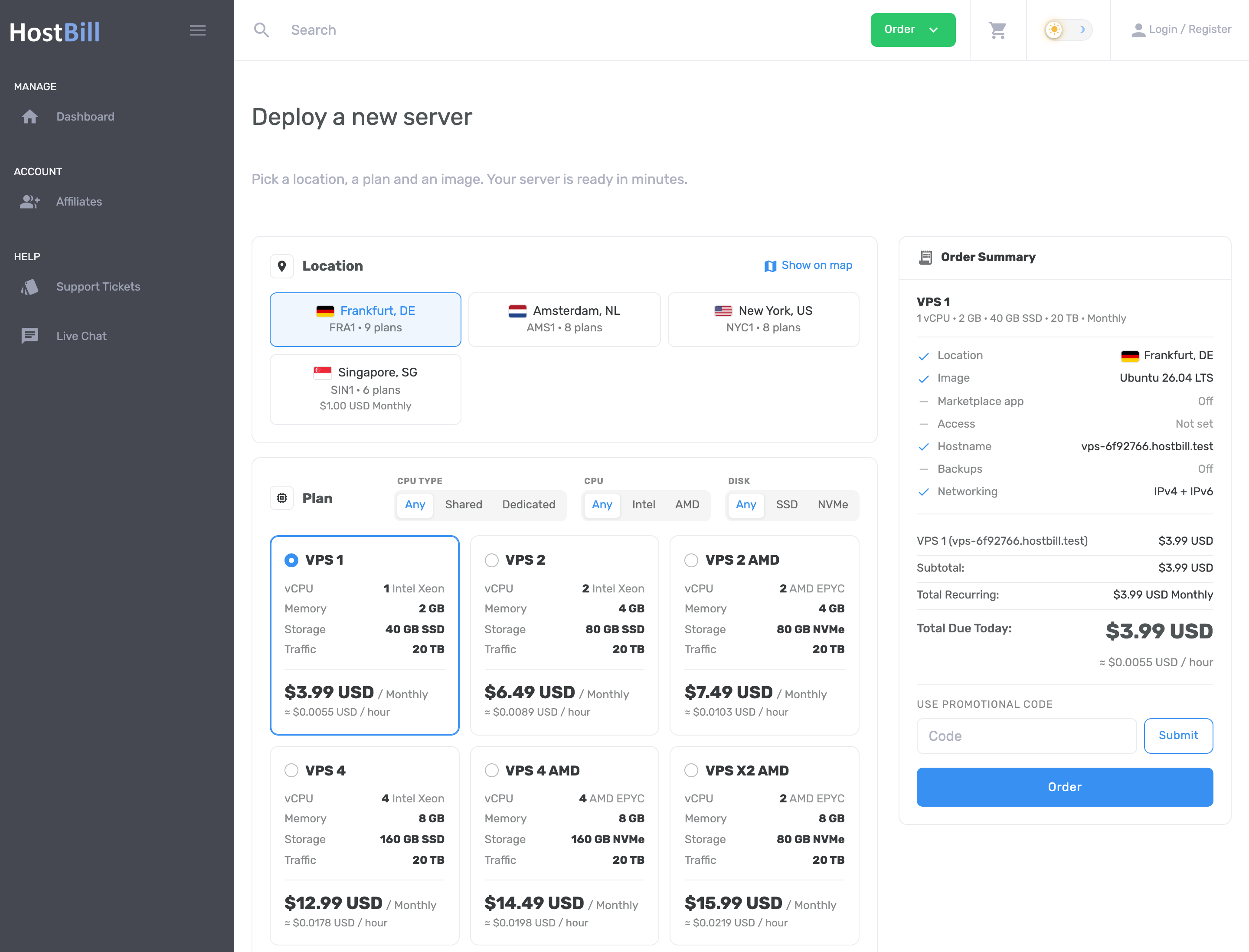
Customers can explore data centers on an interactive map, filter plans by CPU type, processor, and disk, and benefit from intelligent plan matching when switching locations. The page also features an organized OS image selector, a searchable application marketplace, built-in SSH key and password generation, and configurable backup and networking options.
Transparent pricing includes estimated hourly rates, billing cycle discounts, and real-time cost calculations. All specifications, filters, and configuration options are driven by HostBill product features and forms, making the order page easy to customize for any VPS offering.
Watch the video overview:
New Baseline Colocation Order Page: simplified rack space ordering
The new OneStep Baseline Colocation order page makes it easier for customers to browse, compare, and configure colocation services. Available rack options are presented as detailed cards with visual rack representations, power specifications, network connectivity, IP allocations, availability, and pricing.
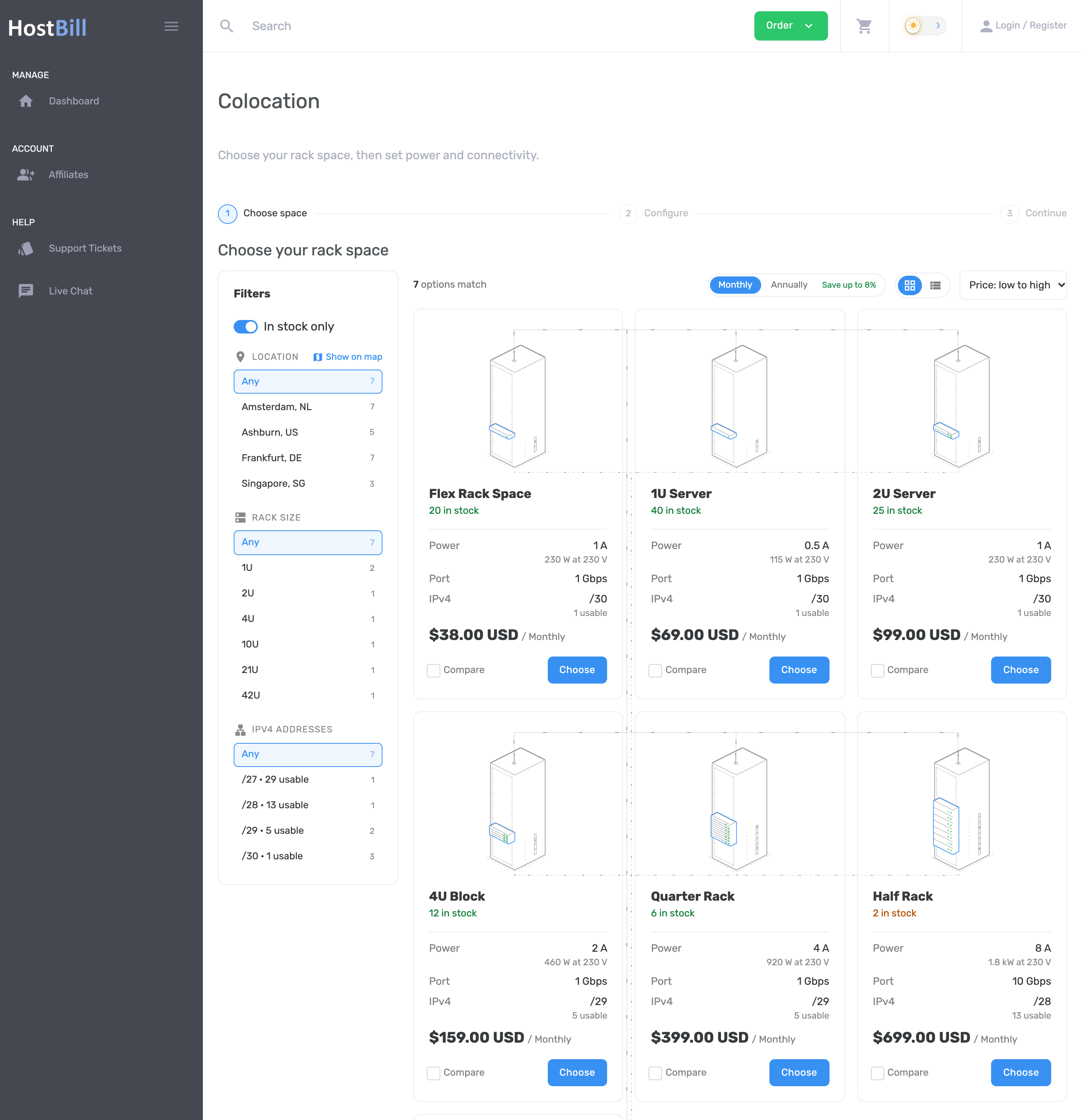
Customers can filter rack space by location, size, and IPv4 block, explore facilities on an interactive world map, and compare up to three options side by side. Monthly and annual pricing views highlight available discounts, helping customers choose the most suitable package.
Once a rack space is selected, customers can customize their configuration with additional rack units, power allocation, redundant feeds, bandwidth, networking options, and services such as remote hands, rack-and-stack installation, out-of-band access, and BGP sessions. An interactive rack visualization and real-time order summary reflect every change, including recurring charges and setup fees.
With flexible, product-driven configuration, Baseline Colocation simplifies complex colocation orders while helping providers showcase their infrastructure and services.
Watch the video overview:
Expanded Frontier admin theme compatibility
We’re continuing to expand support for the modern Frontier admin theme, bringing more HostBill modules and administrative tools into the updated interface.
This release introduces Frontier compatibility for MFA modules, CSV Export, DNS Zone Editor, Gateway Fees, Todo, Webhooks, Staff Sales, SEPA Direct Debit, and Password Manager.
These additions help administrators take advantage of the Frontier interface across more areas of HostBill, providing a more consistent experience when managing security, billing, DNS, integrations, and daily operations.
Security Hardening
Security remains a key priority in HostBill development. This release introduces a series of Security Hardening improvements designed to further strengthen the platform’s security and enhance its overall resilience. These updates are part of our ongoing efforts to maintain a secure and reliable environment for hosting providers and their customers.
Additional features and improvements
Alongside the major new integrations and order pages, this release introduces several enhancements designed to improve usability, flexibility, and financial accuracy.
The Baseline theme now offers the ability to replace the default square-style preloader with a logo-based preloader. This gives hosting providers another way to personalize the client area and create a more consistent branded experience.
Administrators using the Frontier theme can now test regular expressions directly when configuring fields, including client signup fields and product form fields. This allows to validate input rules, identify configuration issues, and ensure that customer-provided information follows the required format.
A new getKPI API call has been added, extending HostBill’s API capabilities and providing another way to access key performance indicators programmatically and creating new opportunities for integrating HostBill data into external reporting tools, dashboards, and automated workflows.
The Cryptomus payment integration now includes new configuration options for a callback IP allowlist and a default base URL. These settings provide additional control over callback handling and integration configuration.
HostBill now automatically decreases a client’s credit balance when an Add Funds invoice is refunded or charged back. This improvement helps maintain accurate client credit balances and ensures that refunded or reversed payments are properly reflected in the billing system.
All changes introduced today as well as bug fixes are listed in the Changelog section on our website!