

New Dedicated Servers Orderpage, Form fields and AI support improvements
This week’s HostBill release brings a powerful combination of AI-driven support improvements, enhanced ordering experiences, more flexible forms, and streamlined administration.
With major updates to AI Support Agent, a brand-new Baseline Dedicated Servers order page, expanded form field options, and improvements to API functionality and integrations, HostBill continues to make hosting automation smarter, more efficient, and easier to manage. Let’s explore what’s new!
New Baseline Dedicated Servers Order Page
HostBill introduces a brand-new Baseline Dedicated Servers order page. Designed to showcase dedicated server offerings in an attractive, modern, and intuitive layout, the new order page helps hosting providers turn complex server configurations into a smooth and engaging shopping experience.
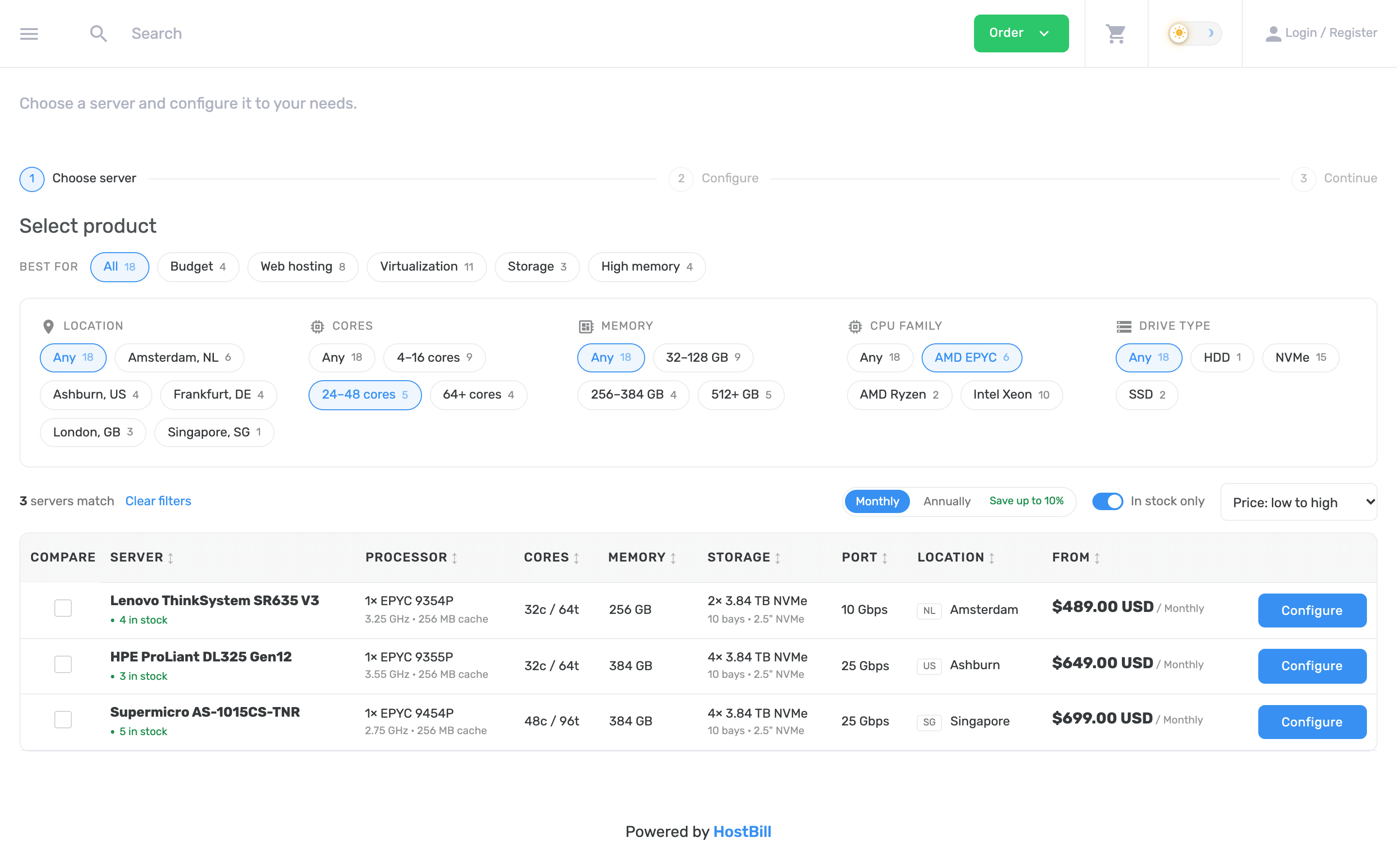
With a clean, professional design and a clear presentation of available server options, customers can easily explore dedicated server plans, compare configurations, and find the solution that best fits their requirements. The streamlined ordering experience makes choosing a dedicated server more straightforward, helping reduce purchasing friction and encouraging customers to complete their orders.
Whether you’re offering powerful enterprise servers, high-performance infrastructure, or cost-effective dedicated hosting solutions, the new Baseline Dedicated Servers Order Page provides an effective way to showcase your products, highlight their value, and drive more conversions.
Watch the video demonstration:
New Form Field types for more flexible data collection
HostBill Forms now offers an expanded selection of field types, giving administrators more options for building forms tailored to different products, services, and customer requirements. The new field types include:
- Email: A dedicated field for collecting email addresses.
- IP Address: A specialized field for entering IP addresses. The field accepts IPv4, IPv6 or CIDR notation.
- Date & Time Picker: A convenient way to select a date with time, or time only, e.g. for maintenance windows or backup slots.
- Date Range: Allows users to pick a start and end date, e.g. for reservation periods.
- Tags Input: Makes it easier to enter and manage multiple values as tags, e.g. several e-mails, IP addresses or domains.
- Country Selector: A dedicated field for selecting countries.
- Code Editor: Multi-line text field with syntax highlighting for .htaccess, DNS zone files and config snippets.
- Enhanced Password Fields: Introduces a password strength meter and minimum entropy requirements for encrypted passwords, helping enforce stronger password choices.
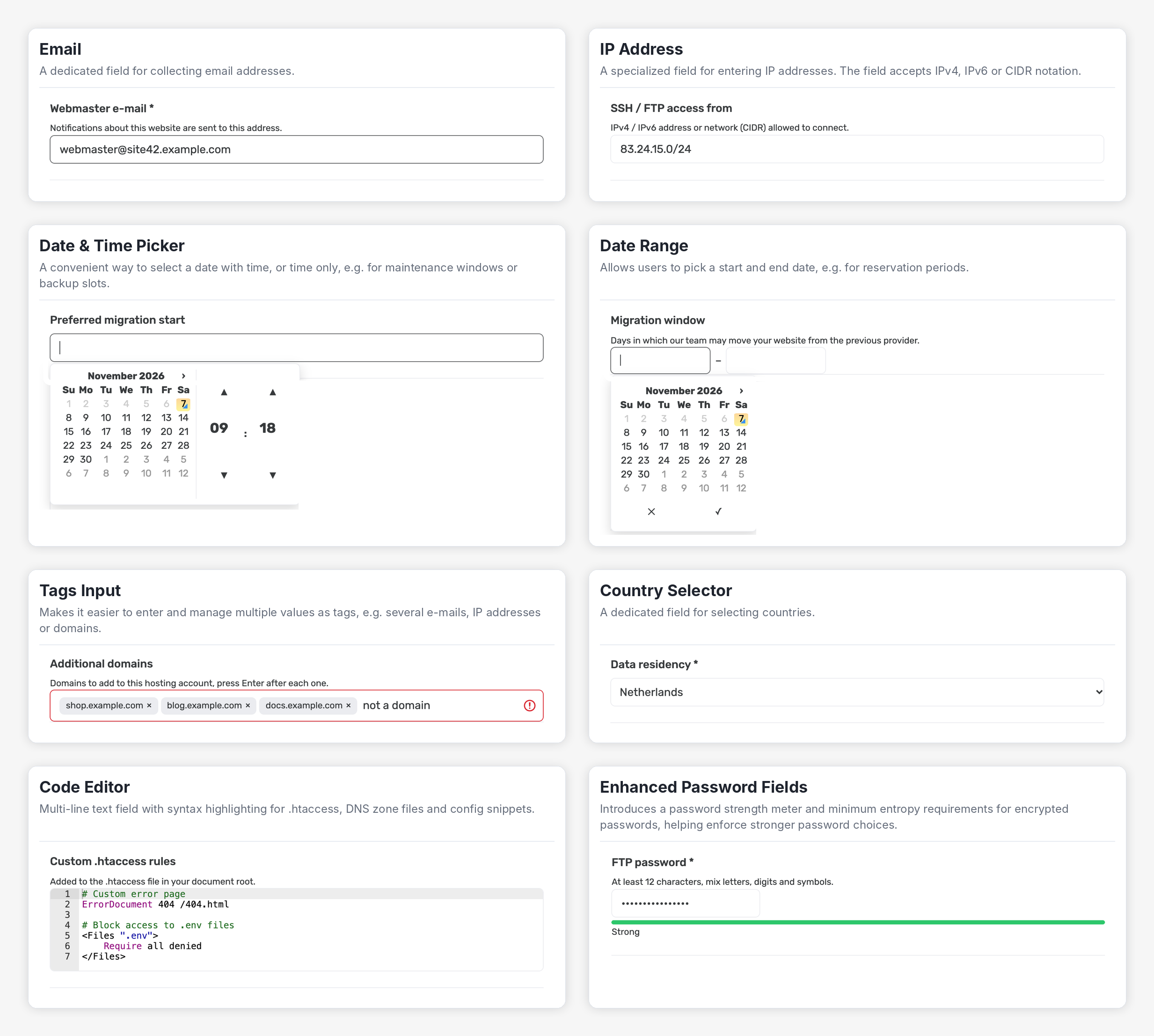
These additions make HostBill Forms more versatile, particularly for businesses offering technical services that require structured inputs, advanced configuration details, or additional security measures.
AI Support Agent: multiple agents, smarter responses, and improved management
The latest improvements to AI Support Agent introduce significant new capabilities for businesses looking to automate customer support while maintaining full control over how AI-generated responses are created and managed.
Multiple AI agents with independent configurations
One of the most important additions is support for multiple AI agents, each with its own prompts, AI connections and identities. This allows administrators to configure different agents for different support needs, rather than relying on a single global configuration. For example, you can create one agent focused on technical support and another dedicated to billing inquiries, each with its own instructions and response style. To support this flexibility, global module settings have been replaced with per-agent configuration, making it easier to customize individual agents and manage their behavior independently.
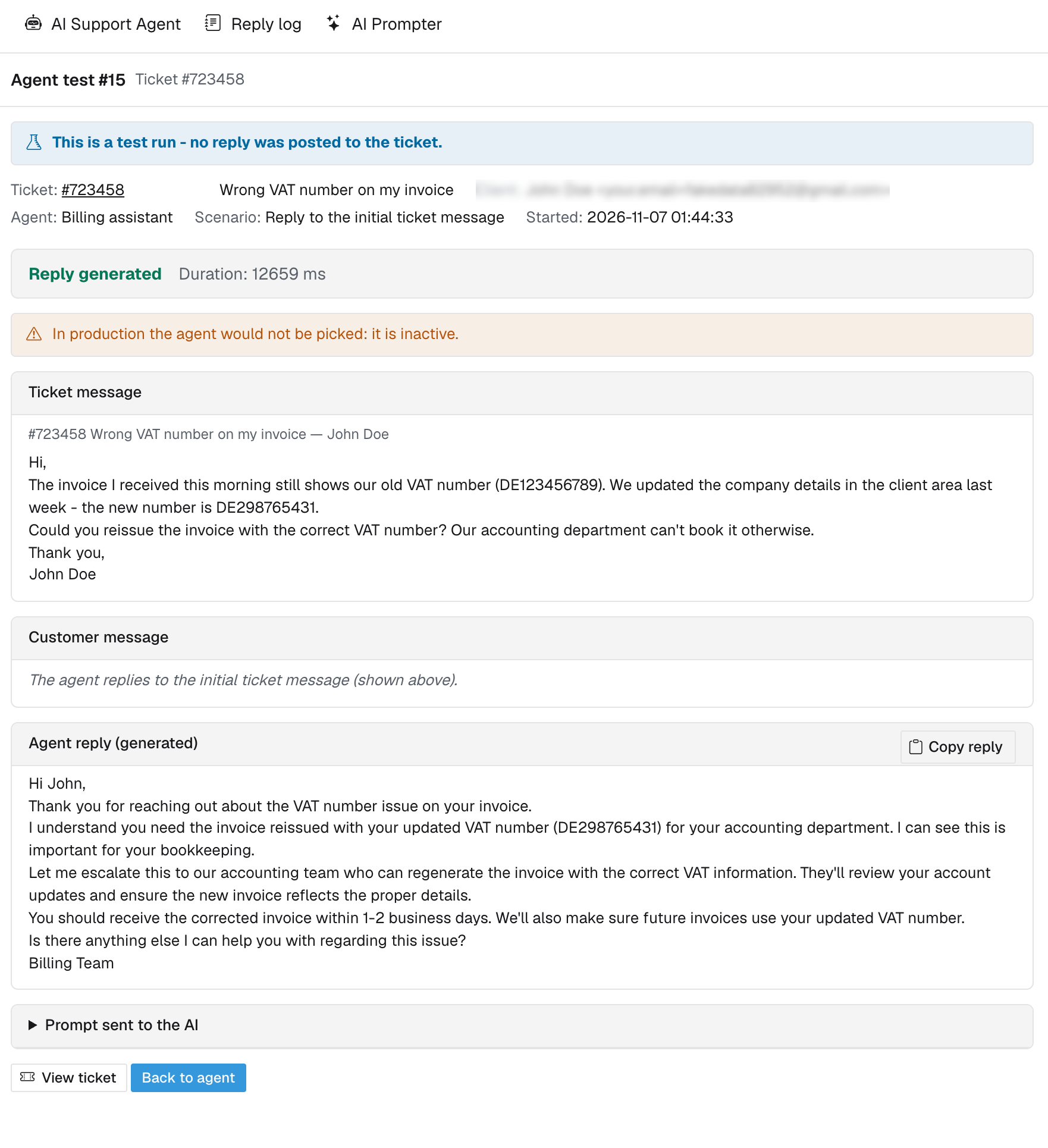
Test AI agents without affecting customer conversations
Administrators can now test AI agents using existing support tickets without adding replies to the actual ticket conversations. This provides a convenient way to evaluate generated responses, fine-tune prompts, and verify agent behavior before using an agent in live customer interactions.
Improved prompt management and configuration
The agent configuration form has been redesigned around a single prompt source and mode, simplifying setup and reducing unnecessary complexity. Prompts of the AI support agent whole ticket type can now be used for both new-ticket and new-reply scenarios, offering greater flexibility and reducing the need to maintain separate prompts.
The interface has also been improved with an Ace-based prompt editor, access to available variables, and prompt injection warnings. The agent list now displays only the prompt actually used by each agent, making configurations easier to review. The update also resolves Smarty v2 template errors.
New reply logs for better visibility
A new reply logging system provides administrators with a clearer view of AI-generated support responses. Generated replies are stored in a dedicated replies table and can be reviewed through a paginated, filterable log interface available in both admin themes.
Additionally, new cross-module links in the top menus of AI Support Agent and AI Prompter make navigating between the two modules more convenient.
AI Prompter: New prompt purpose for AI Support Agent
AI Prompter has also received an update that strengthens its integration with AI Support Agent. A new prompt purpose type has been introduced specifically for use with AI Support Agent, expanding the ways prompts can be organized and assigned within AI-powered support workflows. Together with the latest AI Support Agent improvements, this addition makes it easier to build, configure, and maintain specialized AI support workflows using reusable prompt configurations.
Learn more in the AI Prompter documentation and AI Support Agent documentation.
Faster administration with multi-component search and filtering
Managing large numbers of customers and services becomes easier with new search and filtering capabilities in the HostBill admin area. Administrators can now filter Accounts using multiple components, providing more flexibility when narrowing down account lists. Similarly, the Clients section now supports searching by multiple components, making it easier to locate specific customer records. These are particularly useful for businesses managing extensive customer databases and service portfolios, where efficient navigation and precise searches can save valuable administrative time.
API Enhancement: Search Services by IP Address
A new API call, searchServiceByIPLimited, has been introduced for the AccountSearch module.
This addition extends the available API functionality for searching services using IP addresses, supporting integrations and administrative workflows that rely on IP-based service identification. For providers managing large hosting infrastructures, IP-based service searches can be especially useful when investigating technical issues, identifying associated services, or developing custom administrative tools.
UserAPI: Enhanced Security and Frontier Theme Support
The latest UserAPI improvements focus on compatibility, authentication flexibility, and security. Frontier theme support has been added, ensuring that UserAPI functionality is compatible with HostBill’s new admin interface. A new client-level setting also allows administrators to configure an exception to MFA and IP whitelist requirements for API authentication. This provides additional flexibility for integrations and automated workflows that require different authentication arrangements. Because bypassing these protections reduces authentication safeguards, the option should be enabled only where appropriate and with careful consideration of security requirements.
The update also introduces additional security hardening for UserAPI, further strengthening the module’s overall security.
All changes introduced today as well as bug fixes are listed in the Changelog section on our website!