

New MCP Server Support for AI Prompter
Today, we’re introducing a new addition to HostBill AI Prompter: MCP Server support, designed to connect AI-powered tools with HostBill functionality through a standardized integration protocol.
MCP Server Support for AI Prompter
Model Context Protocol (MCP) is an open standard that enables AI applications to communicate with external systems, data sources and tools. MCP provides a standardized connection between AI assistants and business applications, allowing AI tools to access information and perform supported operations without requiring a separate custom integration for every AI client.
With MCP support, HostBill AI Prompter can now expose HostBill Admin API functionality to compatible AI assistants and agents.
This means you can use natural language to interact with HostBill data, making everyday tasks faster and more convenient. Instead of switching between different interfaces or manually searching for information, you can access relevant HostBill data directly from your AI environment. For example, you can ask your connected AI assistant to:
- Find a specific customer and retrieve their account information.
- Look up active services associated with a client.
- Retrieve invoice details and billing information.
- Find support tickets and review their details.
- Work with other HostBill Admin API features permitted by the configured API key.
The new MCP Server offers two connection methods, giving you the flexibility to choose the setup that best suits your environment: Remote Connection via HTTP with OAuth Authentication and Local Connection via CLI (stdio).
The HTTP transport enables external MCP-compatible AI clients to connect remotely to your HostBill installation. With OAuth authentication, you can establish authenticated connections between HostBill and supported AI applications. This approach is ideal for businesses that want to use external AI assistants, such as Claude, ChatGPT or other MCP-capable platforms, to interact with their HostBill environment. Once the connection is configured and authorized, the AI client can access the HostBill Admin API tools exposed through MCP, subject to the permissions granted.
For local integrations, HostBill also supports MCP connections through the command-line interface using stdio transport. This option is designed for locally running AI tools, development environments and agents that communicate with MCP servers through standard input and output. It provides an alternative to remote HTTP connections and is particularly useful when building local AI workflows or integrating HostBill with compatible development tools.
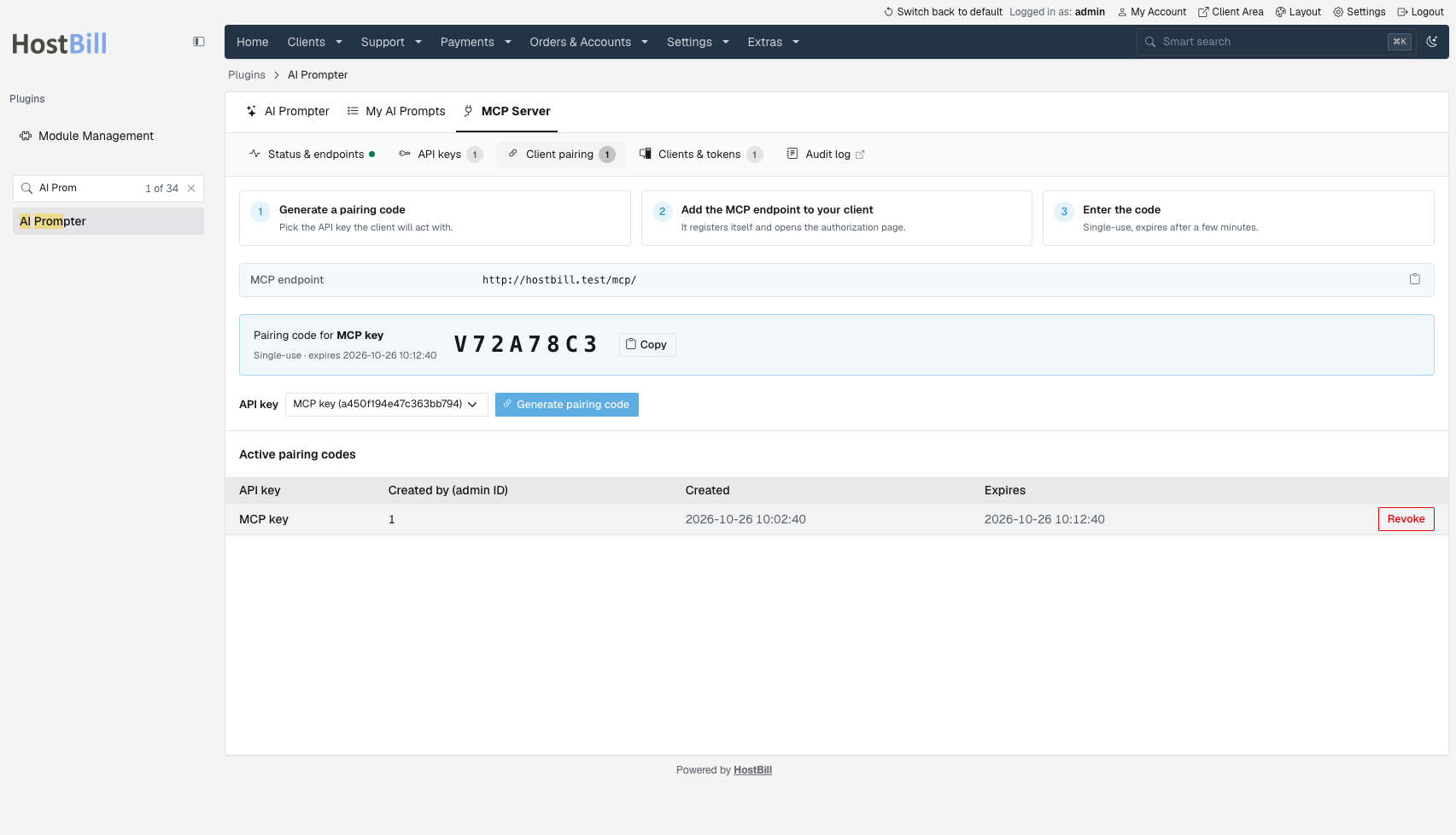
MCP Server functionality is integrated directly into the HostBill AI Prompter module. When generating an integration using your configured Admin API keys, you can now select MCP as the generation target. This allows you to prepare an MCP connection based on the Admin API access you have configured. The available functionality is determined by the permissions associated with the selected API key, giving administrators control over which HostBill operations can be exposed to connected AI tools.
Built-In Security and Access Control
Connecting AI assistants to business-critical systems requires careful control over authentication, permissions and access. That’s why HostBill’s MCP Server includes a comprehensive set of security features designed to help administrators manage and monitor AI connections.
MCP access respects the permissions configured for HostBill Admin API keys. Administrators can define which API operations are available, limiting AI integrations to the functionality they require. Support for dynamic client registration simplifies the process of connecting compatible MCP clients, enabling clients to register as part of the authentication workflow. HTTP transport includes pairing-code consent, adding an authorization step when establishing connections with external AI clients. Built-in rate limiting helps control the frequency of requests, reducing the risk of excessive API usage. Administrators can restrict access based on permitted IP addresses, providing another layer of control over which systems can communicate with the MCP Server. Authentication tokens can be managed throughout their lifecycle, supporting controlled access to MCP connections. An audit trail records MCP-related activity, helping administrators review interactions and maintain visibility into how connected AI tools access HostBill. Together, these capabilities provide a security framework for integrating AI assistants with sensitive hosting and billing operations.
The new MCP Server makes it possible to incorporate HostBill information into AI-assisted workflows without constantly switching between applications. For hosting providers, domain resellers and other service businesses, this creates opportunities to streamline routine administrative work. Developers can also use MCP to build more advanced AI-powered workflows that combine HostBill functionality with other connected systems. As MCP is a standardized protocol, businesses gain more flexibility in choosing the AI tools and environments they want to work with.
Release notes
On top of the AI Prompter update, we’re also bringing several other improvements to HostBill this week.
When using the Frontier Theme Dark Mode, HostBill now allows administrators to configure a dedicated logo path for dark mode to make it easier to maintain consistent branding across different interface appearances. Instead of relying on a single logo for every background, administrators can specify a version optimized for dark mode, ensuring better visibility and a more polished look.
We also continue to refine Frontier, the new HostBill admin panel, with interface updates designed to improve usability. The module container interface in Frontier has been updated to provide a cleaner and more consistent experience. We’ve also updated the support ticket layout in the Frontier theme. The refreshed interface improves the presentation of ticket information, helping support teams work with customer requests in a more organized environment.
For businesses managing multiple billing contacts, choosing the right contact during checkout should be simple. With this update, the Billing Contact Select feature now displays the contact’s company name in the cart contact selection interface. This additional information makes it easier for customers to distinguish between contacts, especially when multiple contacts have similar names or belong to different organizations.
A new configuration option has been added to Domain Management. It’s now possible to control whether prices for unconfigured TLD registration periods should be imported into HostBill. The new setting gives domain resellers more flexibility when synchronizing pricing information and reduces the need for unnecessary adjustments after imports.
We’ve introduced improvements to the HostBill updater to make software updates more reliable. The updated logic now:
- Skips migrations that have already been applied, avoiding unnecessary repeated operations.
- Locks the update process, helping prevent overlapping update executions.
These behind-the-scenes improvements support a more controlled update process and reduce the risk of conflicts during software maintenance.
We’ve expanded the Support PIN functionality with new API capabilities. The update introduces Admin API and User API calls to list support PINs, view support PIN details and generate support PINs. These new endpoints make it easier to integrate Support PIN functionality into automated workflows, custom applications and external support systems.
The CentralNic SSL integration now includes an option to set a Certificate ID directly in account details, to give admins more flexibility when managing SSL certificate records through the integration.