


PHP Security Advisory: CVE-2026-109618 & CVE-2026-109619 and your HostBill installation
On October 21, 2026 the PHP project released emergency security updates for two critical vulnerabilities in the PHP engine itself: CVE-2026-109618 and CVE-2026-109619 (also referred to as “PHP2Shell”). These issues are not specific to HostBill. They affect PHP itself, which means every application running on an unpatched PHP version is exposed, including HostBill. Please make sure the server running your HostBill is updated as soon as possible.
What is the issue?
Both vulnerabilities are rated critical (CVSS v4.0 9.2) and can allow an unauthenticated attacker to execute code remotely on a server running PHP:
- CVE-2026-109618: memory corruption when PHP handles an out-of-memory condition during a request.
- CVE-2026-109619: internal state from one request can survive after its memory has been freed and may be reused by a later request.
According to the PHP project, every PHP installation that serves web requests is at risk, regardless of how PHP runs (PHP-FPM, Apache mod_php, CGI, LiteSpeed and others). The risk is highest on Apache with mod_php. Exploitation attempts have already been reported, so we strongly recommend treating this update as urgent.
Fixed PHP versions
- PHP 8.3: 8.3.36 or higher
- PHP 8.2: 8.2.35 or higher
- PHP 8.1 and older: no official fix, as these versions have reached end of life
How does this affect HostBill?
HostBill supports PHP 8.1, 8.2 and 8.3 since April this year. Here is what we recommend depending on your current setup:
- If you run PHP 8.2 or 8.3: update PHP on your server to the patched release (8.2.35 / 8.3.36 or higher) using your operating system packages or control panel.
- If you run PHP 8.1 or older: the PHP project no longer releases security fixes for your version. Some operating system vendors and control panels provide backported patches, but the safest long-term solution is to upgrade to PHP 8.3.
Before you upgrade: create a backup
Before changing or updating your PHP version, we strongly advise creating a full backup or a server snapshot of your HostBill installation, including both the files and the database. This lets you quickly restore your system if anything unexpected happens during the upgrade.
Preparing your modules for PHP 8.3
Before switching PHP versions, make sure that all modules installed in your HostBill support PHP 8.3. The HostBill Auto-Upgrade tool can check and update your modules for PHP 8.3 compatibility before you upgrade.
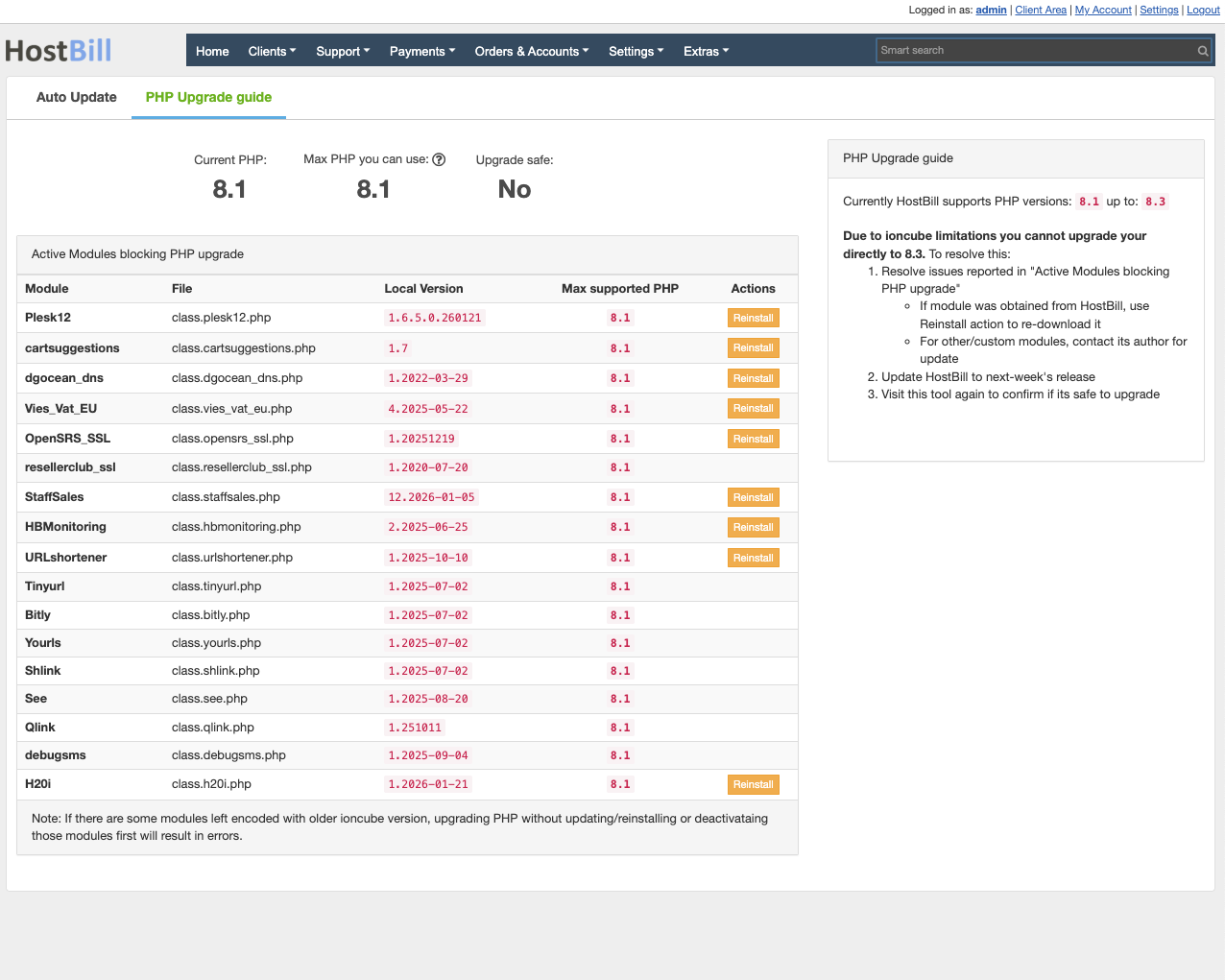
After updating, click “Reinstall” or “Refresh” in the Auto-Upgrade tool to check again whether any module still needs manual intervention.
Bulk download of modules
If you prefer to download all modules for your HostBill installation at once, use the script in your HostBill client area, available in the license details section.
Changing the PHP version on your server
- Servers without a control panel: if HostBill was installed with our auto-install script on a server that is not managed by any control panel, this step-by-step guide may help: Upgrade PHP 8.1 to 8.3 on CentOS / Alma / Rocky 8 & 9.
- Servers managed by a control panel (such as cPanel, Plesk and others): please refer to your control panel’s documentation for instructions on changing the PHP version.
Seeing ionCube errors after switching PHP?
After upgrading PHP, you may see ionCube errors for some files in your HostBill installation. How to handle them depends on where the files come from:
- Custom-built modules or files that are still in use: please contact us. These files need to be rebuilt for the new PHP version.
- Modules you no longer use: errors related to unused modules can, in most cases, be safely removed. This often happens after using the bulk download script mentioned above, since it downloads every module available for your license. If you are unsure whether a file is safe to remove, please contact us before deleting it.
Coming soon: PHP 8.4 and 8.5 support
Support for PHP 8.4 and PHP 8.5 in HostBill is rolling out over the upcoming weeks. We will announce it on our blog as soon as it is available.